













.webp)


Real-time deepfakes are AI-generated face and voice replacements that operate during a live video call, identity verification check, or streaming session. Unlike pre-recorded deepfake videos, they synthesize a target identity frame by frame, with latency low enough to fool human conversation partners and automated verification systems.
This guide explains the technical pipeline behind live deepfakes: how faces get detected, swapped, blended, and pushed into a video stream in under 100 milliseconds. It is written for security leads, IDV product managers, fraud officers, and compliance teams who need to understand how these attacks function in order to defend against them.
The mechanics matter because the defense story has changed. Five years ago, a deepfake required hours of rendering and a curated dataset. Today, a single reference photo and a consumer GPU produce a passable real-time face swap that can sit through a KYC video call or a job interview. Understanding the moving parts is the first step in building a detection strategy that holds up against tools already in the hands of attackers.
- Real-time deepfakes operate under a per-frame latency budget of roughly 30 to 50 milliseconds, which forces lower resolution and smaller models than offline deepfakes.
- The standard live face swap pipeline has six stages: capture, face detection, landmark extraction, synthesis, blending, and output.
- Autoencoders, GANs, and distilled diffusion models are the three synthesis architectures currently used for live face swap, with each producing distinct artifact patterns.
- A consumer GPU with 8 to 12 GB of VRAM is enough to run most current open-source live face swap tools at 720p.
- Virtual camera drivers, browser-level MediaStream override, and hardware capture devices are the three main paths for injecting synthesized video into a target application.
- Real-time voice cloning runs at 200 to 500 ms end-to-end latency and is typically paired with face swap in combined identity attacks.
- The most consistent detection signals are temporal jitter at the face boundary, unnatural blink patterns, gaze lag, audio-visual desync, and lighting mismatches.
- Passive liveness checks designed for photo or screen replay attacks generally cannot detect modern live face swap, because the deepfake responds to motion and prompts in real time.
A live deepfake isn't a file to analyse later, it's in the call right now, generated frame by frame on consumer hardware, and pushed through a virtual camera into KYC checks and video meetings.
What Are Real-Time Deepfakes?
A real-time deepfake is a synthetic video or audio stream produced live, frame by frame, with the output appearing in a video conferencing tool, a browser-based verification flow, or a streaming application. The defining characteristic is latency: the system must generate each frame within roughly 30 to 50 milliseconds to maintain the 24 to 30 frames per second cadence of a normal video stream.
Live deepfakes are a subset of the broader deepfake category, but they pose a distinct threat class. A pre-recorded deepfake is a forensic problem. You have the file, you can analyze it offline, you can compare it to known authentic footage. A live deepfake is an operational problem. It sits in the call right now, the conversation is happening, and any detection has to fire fast enough to flag the session before the fraud completes.
Two main modalities exist. Live face swap replaces a source person's face with a target identity, typically by mapping facial landmarks from the source to a synthesized version of the target. Live voice cloning, sometimes called real-time voice conversion, transforms a speaker's voice into a target voice in near real time. Sophisticated attackers combine both, running a synchronized audio-visual identity replacement during a single session.
How Real-Time Face Swapping Works
The pipeline behind a live face swap looks roughly the same across most current tools. Frames flow through a sequence of neural network stages, each optimized to run on the GPU, with the entire chain budgeted to complete in under 50 milliseconds per frame.
Step 1: Capture. A webcam or screen capture grabs the source video frame. This is the attacker's own face, lit and framed however their environment allows.
Step 2: Face detection. A lightweight detector model locates the face in the frame and returns a bounding box. Common architectures include RetinaFace, SCRFD, and MediaPipe variants. This stage typically runs in 5 to 10 milliseconds.
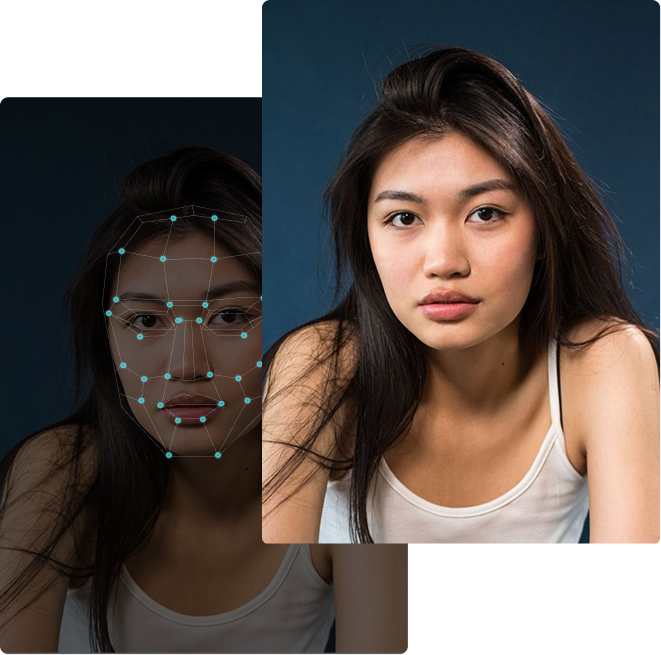
Step 3: Landmark extraction. A second model identifies anywhere from 68 to 478 facial keypoints: corners of the eyes, edges of the lips, jawline, brow positions. These landmarks describe the source face's pose, expression, and orientation. They are the control signal that tells the synthesis model how to deform the target identity.
Step 4: Synthesis. The core neural network takes two inputs: the encoded representation of the target identity (extracted ahead of time from one or more reference images) and the landmark pose data from the current source frame. It outputs a synthesized image of the target person's face in the same pose, with the same expression, as the source. This is the most computationally expensive step and the one most often optimized using techniques like TensorRT inference or model quantization.
Step 5: Blending. The synthesized face is composited back into the source frame, blended at the boundary to match skin tone, color temperature, and lighting. A simple alpha mask is rarely enough. Modern pipelines use Poisson blending or learned blending networks to soften the seam where the new face meets the original neck, hair, and background.
Step 6: Output. The composited frame is pushed to a virtual camera driver, such as OBS Virtual Camera, which presents itself to the operating system as a standard webcam. Zoom, Teams, Meet, and most KYC video flows pick up the virtual camera with no awareness that the feed is synthesized.
Six stages, every frame, under one clock
A live deepfake isn't a file you analyse later, it runs in the call right now. The whole chain has to finish inside the per-frame budget needed to hold 24 to 30 fps, which forces smaller models and lower resolution.
Synthesis eats most of the budget, so models are distilled, quantized and run at lower resolution, and those very compromises are what leave the temporal jitter, blink and gaze tells detectors target.
Table 1: Stages of a live face swap pipeline with typical models and per-frame latency budgets
The Components of a Live Deepfake System
Each stage in the pipeline corresponds to a specific neural network architecture and a set of engineering trade-offs. Understanding them clarifies where artifacts come from and which defenses are likely to work.
Face Detection
Face detectors must be fast and reliable. RetinaFace and SCRFD are common choices because they handle multiple scales and partial occlusions without much overhead. The detector's output is a bounding box and a confidence score. False negatives at this stage cause flickering, since the swap drops out for any frame where the face is not detected.
Facial Landmark Extraction
Landmark models map the geometry of the face. Older systems used 68-point landmarks borrowed from dlib. Modern tools use dense landmark sets of 200 to 478 points, often with per-keypoint uncertainty estimates. Dense landmarks let the synthesis model reproduce subtle expression changes, but they also expand the surface area for jitter when the detector is imperfect.
The Synthesis Model
This is the heart of the deepfake. Three architecture families dominate.
Autoencoders. The original DeepFaceLab approach. Train an encoder that converts a face into a compressed latent code, and two decoders, one trained on the source identity and one on the target. To swap, route a source-encoded face through the target decoder. Autoencoders are mature, well-understood, and relatively cheap to run at inference time.
Generative adversarial networks. GAN-based face swap systems pair a generator with a discriminator that learns to distinguish real from synthesized faces. The generator improves until the discriminator can no longer tell. GAN outputs tend to be sharper than autoencoder outputs but harder to train and prone to mode collapse.
Diffusion models. The most recent generation. Diffusion-based face swap produces the highest quality outputs and the best identity preservation, but is computationally expensive. Real-time diffusion requires aggressive optimization: distilled student models, fewer denoising steps, and specialized hardware kernels. Most current live deepfake tools that use diffusion still operate at reduced resolution or frame rates compared to autoencoder pipelines.
Blending and Compositing
The blend determines whether the swap looks real or looks like a mask floating on top of someone's head. Good blending models learn to match the skin tone gradient at the face boundary, replicate the local lighting direction, and feather the alpha mask along the jawline and hairline. Bad blending leaves visible seams, mismatched color at the neck, or a halo effect around the face.
Output and Injection
The final frame must enter the target application's video feed. The most common path is a virtual camera, a software driver that presents itself to the operating system as a physical webcam. The deepfake tool writes frames to this driver, and any application requesting a camera feed receives the synthesized output.
More sophisticated attacks bypass the virtual camera and inject directly into the application. Browser-based injection uses developer tools or browser extensions to override the MediaStream API and feed synthetic frames into a WebRTC pipeline before the application's JavaScript ever sees a webcam. Some attackers use hardware capture devices that present pre-recorded or live-synthesized video as raw input, defeating virtual camera detection entirely.
Real-Time Voice Cloning: The Audio Side
Voice is the parallel modality. A complete live identity replacement needs to sound right, not just look right.
Real-time voice cloning takes two inputs: a sample of the target voice (often as short as 5 to 15 seconds) and the source speaker's live audio. It outputs the source speaker's words rendered in the target voice, with latency low enough to feel like a normal conversation. Modern systems achieve 200 to 500 millisecond end-to-end latency, which is noticeable but tolerable in a typical call.
The pipeline is similar in shape to the face swap pipeline. Voice activity detection identifies when the source speaker is talking. A feature extractor converts the source audio into a representation that separates linguistic content from speaker identity. The target voice's identity embedding, computed once from the reference audio, is combined with the linguistic features. A vocoder synthesizes the final waveform.
Two architecture types dominate. Voice conversion models transform the source audio directly into the target voice, preserving timing and intonation. Streaming text-to-speech with cloned voices first transcribes the source audio into text, then synthesizes the target voice speaking that text. Voice conversion is faster and preserves natural prosody. Streaming TTS produces higher quality output but adds the latency of the transcription step.
A note on audio-visual synchronization. Combined face-and-voice live deepfakes face a synchronization problem. The audio and video pipelines have different latencies, and if they drift, viewers and detectors can spot the desync. Mature attack tools pad the faster pipeline to match the slower one, but the resulting fixed offset can itself be a detection signal if it is unusually consistent.
How Live Deepfakes Get Into Calls and KYC Flows
Generating a synthesized face is only half the attack. The other half is delivering that face into the target application without being flagged as a non-camera source.
Generating the face is only half, it has to get in
A synthesized face is harmless until it's fed into an app that treats video as a real, present human. There are three routes in, and the harder they are for an attacker to set up, the harder they are to detect.
Camera attestation only confirms a driver is reporting frames, not that they came from a real sensor. Closing this needs injection-channel inspection plus frame-content analysis, checking the stream itself, not just the device.
Virtual camera injection is the dominant method. Tools like OBS Studio install a virtual camera driver that exposes itself to the operating system as a standard webcam. The deepfake tool writes synthesized frames into the driver. Any application that requests a webcam (Zoom, Teams, Google Meet, browser-based KYC tools) receives the synthesized stream. From the application's perspective, this is indistinguishable from a real camera unless the application performs additional checks.
Browser injection targets web-based identity verification flows. JavaScript-level attacks use browser extensions or developer tools to override the getUserMedia API, intercepting the application's request for a camera and returning a custom MediaStream. This bypasses operating-system level virtual camera detection because no virtual camera driver is involved at all.
Hardware injection is the highest-effort, hardest-to-detect path. The attacker uses a hardware capture device, sometimes a modified HDMI capture card, to present a pre-recorded or live-rendered video stream to the host computer as if it were a physical camera. The deepfake video is generated on a separate machine and fed in through the capture device, so the device hosting the call sees a hardware-attached camera with no software trace of synthesis.
Table 2: Methods used to inject a synthesized video stream into a target application
Real-Time vs Pre-Recorded Deepfakes
The differences between live and pre-recorded deepfakes are not just operational. They produce different artifacts and require different detection strategies.
Pre-recorded deepfakes are generated offline, often with unlimited compute time per frame. The synthesis model can run at full resolution, multiple passes, and post-processing steps that smooth out artifacts. Quality is generally high. Detection focuses on subtle inconsistencies that survive even careful generation: irregular eye blink patterns, mismatched lighting between face and scene, frequency-domain artifacts left by the generator network.
Real-time deepfakes are generated under a hard latency budget. Models run at lower resolution, fewer denoising steps, smaller architectures. Quality is lower in absolute terms but optimized for the perceptual conditions of a video call: motion blur, compression, and small viewport size that hide many artifacts a frame-by-frame forensic analysis would catch. Detection has to work in real time, on a noisier signal, with the added constraint that any false positive blocks a legitimate user from completing their call or verification.
Table 3: Key differences between real-time and pre-recorded deepfakes
Common Detection Signals in Live Deepfakes
Real-time generation leaves consistent artifacts that defenders can target. The latency budget forces compromises, and most compromises show up as detectable patterns.
Temporal inconsistency. Pre-recorded video shows consistent micro-movements: skin texture shifts, sub-pixel motion in hair and clothing, natural eye saccades. Live deepfakes often show frame-to-frame jitter at the face boundary, inconsistent texture under motion, or unnatural smoothness in regions the synthesis model handles poorly.
Blink rate anomalies. Human blink rates average 15 to 20 per minute under normal conversation. Older live deepfake systems struggled with blink generation entirely, producing eyes that stayed open for long stretches. Modern systems generate blinks but often at incorrect rates, with both eyes closing in perfect synchronization, or with blinks that lack the natural asymmetry of real eyelid movement.
Face boundary artifacts. The blending step is where most live deepfakes show their seams. Look for color discontinuities between the face and neck, halos around the hairline, warping of background pixels when the head moves quickly, or ears that disappear and reappear as the head rotates.
Eye and gaze artifacts. Eye reflections (catchlights) often do not match the lighting in the rest of the scene. Pupils may not dilate naturally in response to brightness changes. Gaze direction can lag head movement, since the synthesis model is interpolating from landmarks rather than actually tracking what the source person is looking at.
Audio-visual desync. Combined face-and-voice deepfakes maintain a fixed offset between modalities. Authentic recordings show natural micro-variation as the speaker's mouth shape and audio waveform shift together. Live deepfakes often have lip movements that lead or lag the audio by a few frames in a way that does not vary with phoneme.
Lighting and reflection mismatches. A real face inherits the lighting of the room: bounce light, color cast from monitors, shadows from a desk lamp. A synthesized face inherits the lighting baked into the training data. Mismatches between face lighting and background lighting are often visible to a careful viewer and even more visible to a frequency-domain detector.
Table 4: Common detection signals in real-time deepfakes and the pipeline decisions that produce them
Common Mistakes Defenders Make
Treating live and pre-recorded deepfakes the same. Detection models trained on offline benchmarks often degrade sharply on live deepfake traffic because the artifact distribution is different. Real-time models produce artifacts in different places than offline models, and a detector tuned to one will miss the other.
Relying only on passive liveness. Liveness checks that work against printed photos and screen replays often fail against modern live face swaps. A live deepfake is, by definition, a live signal. It responds to motion, follows prompts, and blinks on cue. Liveness checks designed to filter for "is this a real person" return positive because there is a real person on the other end, just not the one being claimed.
Trusting the platform's camera attestation. Operating-system-level camera attestation tells you a camera driver is reporting frames. It does not tell you those frames came from a physical sensor. A virtual camera driver passes attestation checks because it is, technically, a camera.
Skipping injection-channel inspection. Detection that only looks at frame content misses the injection signal. A real webcam stream comes with specific metadata: device IDs, frame rate variance patterns, compression signatures. Synthesized streams written through virtual cameras often show telltale uniformity in these metadata channels.
Treating audio and video independently. Combined attacks need combined defenses. A face-swap detector that ignores audio misses the strongest signal in many live deepfake sessions, which is the audio-visual sync drift that the attack cannot fully eliminate.
Practical Recommendations
For IDV providers and security teams who need to defend against live deepfakes, the practical work falls into a few buckets.
Run detection on the live stream, not just the recorded artifact. Detection that runs after the call is forensic, not preventive. Stream-level analysis at the frame rate of the input is the only way to flag a session before the verification completes.
Inspect the injection channel. Add checks for virtual camera drivers, browser-level MediaStream override, and unusual frame timing patterns. A camera that reports perfectly uniform inter-frame intervals is more suspicious than a real webcam, which naturally jitters.
Use multi-signal detection. No single artifact catches all attacks. Combining face-swap detection, audio-visual sync analysis, and injection-channel inspection produces a defense that fails gracefully when any single signal is defeated.
Test with current attack tools, not last year's benchmarks. The gap between academic deepfake benchmarks and current production attack tools widens every quarter. Detection systems should be evaluated against the same generation of tools attackers are actually using.
DuckDuckGoose's DeepDetector is built around stream-level analysis of these specific artifacts: temporal inconsistency, boundary blending, gaze anomalies, and frequency-domain signatures that real-time generation pipelines cannot eliminate within their latency budget. For the audio side, Waver detects the synthesis fingerprints left by streaming voice conversion and TTS systems.
Frequently Asked Questions
What is a real-time deepfake?
A real-time deepfake is a video or audio stream where the speaker's face or voice has been replaced with a synthesized identity, generated frame by frame during a live session. The output appears in a video call, browser-based verification flow, or streaming app, typically within 30 to 50 milliseconds per frame.
How is a live deepfake different from a regular deepfake video?
Pre-recorded deepfakes are generated offline with unlimited compute time per frame and typically show high visual quality. Live deepfakes are generated under a strict latency budget, which forces lower resolution, smaller models, and faster blending steps. They show different artifact patterns than offline deepfakes, which means detection models trained only on offline benchmarks often miss them.
What hardware do attackers need to run a live deepfake?
A consumer GPU with 8 to 12 gigabytes of VRAM is sufficient for most current open-source live face swap tools at 720p resolution. Higher resolution or more sophisticated models require more memory, but the bar has dropped substantially over the past three years. Voice cloning runs comfortably on the same hardware or even on CPU for some streaming models.
How do live deepfakes get into video calls?
The most common method is a virtual camera driver, which presents itself to the operating system as a standard webcam. The deepfake tool writes synthesized frames into the driver, and any application requesting a camera feed receives the synthesized output. More advanced methods include browser-level injection into the MediaStream API and hardware capture devices that inject video at the OS or driver layer.
Can liveness checks detect live deepfakes?
Passive liveness checks designed to detect photo or screen replay attacks generally cannot detect modern live face swaps. The deepfake is, by definition, a live signal: there is a real person on the other end providing motion, blinks, and responses to prompts. Active liveness with challenge-response can raise the bar, but sophisticated tools handle most standard challenges.
What artifacts do real-time deepfakes leave behind?
The most consistent artifacts are temporal jitter at the face boundary, unnatural blink patterns, mismatched lighting between face and scene, audio-visual sync drift in combined attacks, and color discontinuity at the neck and hairline. These artifacts arise from the latency budget that real-time generation operates under.
Are diffusion-based live deepfakes detectable?
Diffusion-based real-time face swap is the highest-quality approach currently available, but it is the most computationally expensive. Most current tools that use diffusion run at lower frame rates or resolution than autoencoder-based tools, and they leave their own characteristic frequency-domain signatures. Detection adapted to diffusion artifacts is an active area of work.
How fast does detection need to run to catch a live deepfake?
Detection has to run at or near the stream's frame rate, typically 24 to 30 frames per second, with a per-frame budget of around 30 to 40 milliseconds to leave room for downstream processing. Detection that runs offline after the session is forensic, not preventive, and does not stop the fraud from completing.

About the author